This plugin displays your Picasa Web Galleries in a post or in a page simply by creating a post or a page with a special keyword. All the images are kept on the Picasa Web Gallery server.
Please note that PHP5 is required.
If enabled and properly configured, kPicasa Gallery will use the WP-Cache mechanism.
You have to choice of using either Lightbox or Highslide for displaying the large version of your photos.
kPicasa Gallery下载地址: http://wordpress.org/extend/plugins/kpicasa-gallery/
一、把下载到的kPicasa Gallery插件上传到你的wordpress主目录下的wp_content/plugins文件夹里。然后,进入到wordpress管理页面激活kPicasa Gallery插件。这时你能在设置页面看到多了一个kPicasa Gallery设置选项
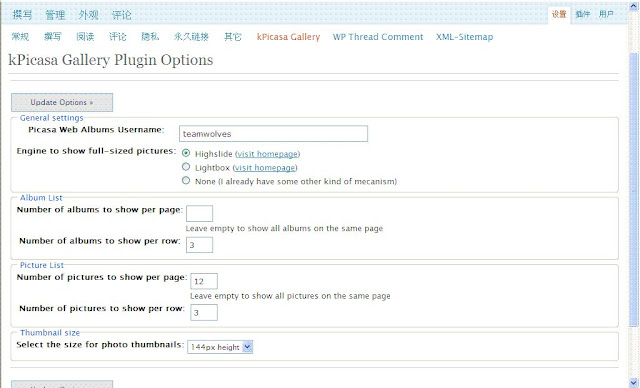
二、设置好相关信息
1.Picasa web Albums Username(Picasa网络相册的用户名)
新用户请注册并下载Picasa ,链接:http://picasaweb.google.com
2.Engine to show full-sized pictures(点击图片的显示方式)
点后面的“visit homepage”可以查看效果第三个是相册列表的选项,每一页显示的相册文件夹数量和每一行相册的数量;在接下来是相册内图片的设置,每一页显示的图片数量、每一行显示图片数量;最后是图片预览的像素。这些都可以根据自己的模板以及喜欢来调整。
3. 保存设置
三、创建新的页面, 命名为”Albums”或其它, 内容里只需输入 KPICASA_GALLERY 再而发布即可.
四、利用本地的Picasa工具上传自己的照片到网络相册里。

没有评论:
发表评论